
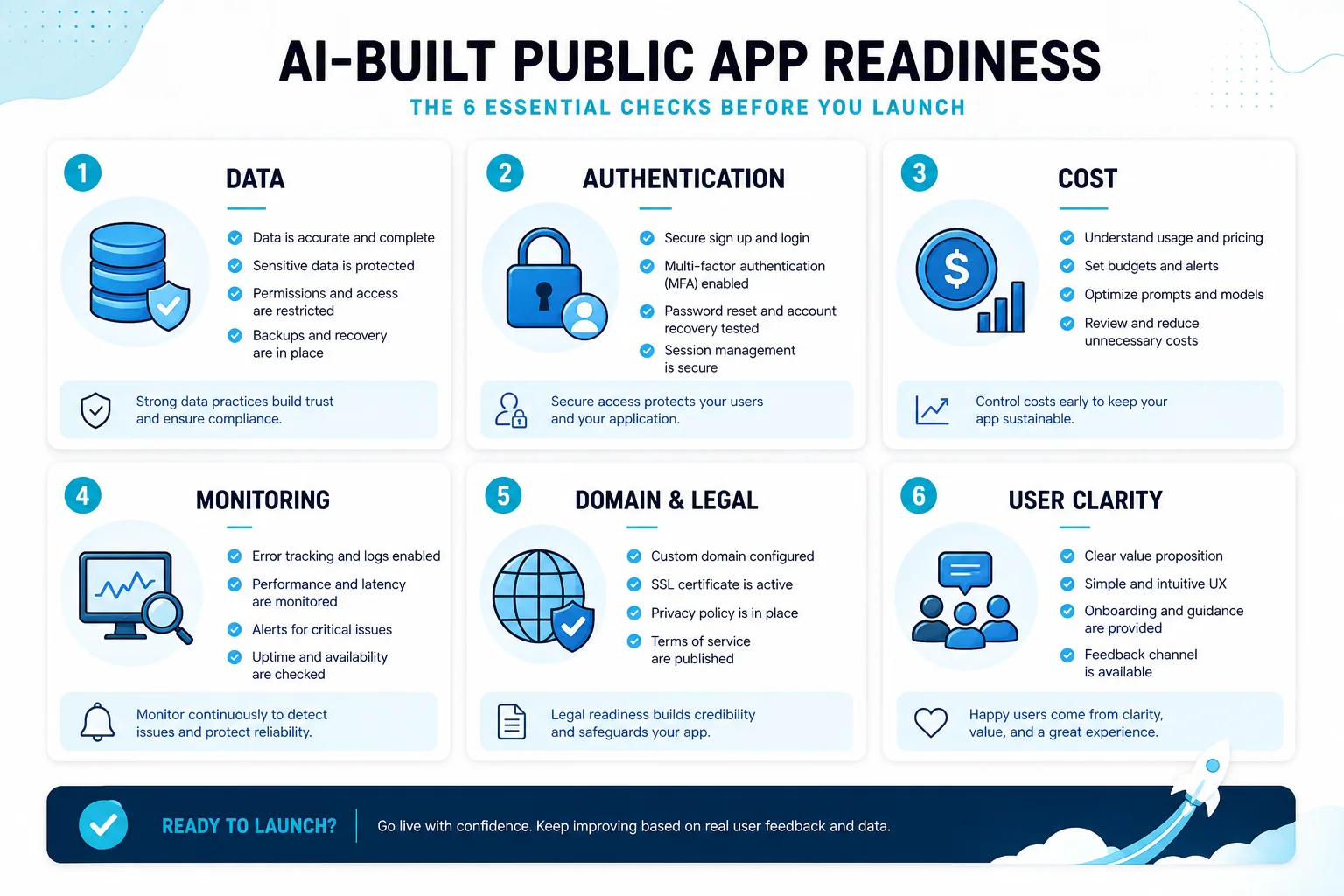
Quick answer: before you send traffic to a vibe-coded app, check six things: data, authentication, costs, monitoring, domain setup, and user clarity. If those are vague, you may have a good prototype, but not yet a public app.
Why beginners hit the “technical cliff”
AI app builders make it easier to create the first version of an app. The hard part often comes next: deployment, environment variables, DNS, SSL, database structure, user accounts, cost controls, and changes after real users arrive. Community discussions around no-code and vibe-coding tools describe this as the moment when a quick build starts feeling like software operations.
The public app readiness checklist
| Area | Question to answer | Why it matters |
|---|---|---|
| Data | What tables or records does the app need? | Bad data structure is expensive to fix after users arrive. |
| Auth | Who can see, edit, or delete what? | Login alone is not permission design. |
| Costs | What usage creates charges? | AI prompts, compute, bandwidth, requests, and databases may be billed differently. |
| Monitoring | How will you know if it breaks? | Public apps need error visibility, not just a working preview. |
| Domain | Where will users go? | A shareable URL is part of the product experience. |
| Clarity | Can a new visitor understand the app in 10 seconds? | Confusing public apps lose users before the feature matters. |
1. Map the data before polishing the interface
Ask what the app remembers. A quiz app remembers questions, answers, users, and progress. A directory remembers listings, categories, locations, and maybe reviews. A booking request app remembers times, customers, statuses, and messages. If you cannot name the data, the app is probably still a mockup.
2. Separate authentication from permissions
“Users can log in” is not the same as “users can only see their own records.” Before launch, write down roles in plain English: visitor, registered user, owner, admin. Then check every sensitive action against those roles.
3. Understand what can cost money
Replit’s docs, for example, separate published-app usage into categories such as outbound data transfer, compute units, requests, and production database usage. Lovable uses credits for AI work and separately documents Supabase-backed data, auth, storage, and functions. The general rule is simple: know what scales with users before users arrive.
4. Add a failure plan
For a simple public app, a failure plan can be modest: know where logs live, know where form submissions are stored, know how to roll back a bad update, and know who gets notified if a key workflow fails. That is still much better than discovering issues from angry users.
5. Make the public page explain itself
A consumer web app should not require a product demo before it makes sense. The landing view should answer: what is this, who is it for, what can I do here, and what happens after I submit information?
The 30-minute pre-launch audit
- Five minutes: open the app as a new visitor and write down where you hesitate.
- Five minutes: submit a fake form or complete the main workflow and confirm where the data lands.
- Five minutes: test a bad input, missing field, or weird edge case.
- Five minutes: check the app on a phone-size screen.
- Five minutes: verify the public URL, page title, and first screen explain the app.
- Five minutes: identify one person who can try it and tell you what confused them.
Red flags that mean “do not launch yet”
- The app stores personal data, but you do not know where that data is stored.
- Any logged-in user can see or edit records that should belong to someone else.
- The app depends on an API key pasted into client-side code.
- You cannot find logs or errors after something fails.
- The app works only in the builder preview, not at the public URL.
- The first screen does not explain who the app is for.
Prompts to give your coding agent before launch
Ask your agent concrete review questions. For example: “List every place this app stores user data,” “Find any route where one user could access another user’s records,” “Explain what could create usage-based cost,” and “Give me the exact rollback plan if this deployment breaks.” These prompts are more useful than asking whether the app is “good.”
A realistic example
Imagine an AI-built quote estimator for a home service business. The prototype looks simple: a form, a formula, and a result. The public app version needs more: spam prevention, clear disclaimers, saved quote requests, notification routing, maybe a private dashboard for the business owner, and a way to edit pricing rules without breaking the app. That is the difference between a demo and a tool people can rely on.
FAQ
Can I launch before everything is perfect?
Yes, if the app handles user data responsibly and the core workflow works. Launching a narrow app with clear limits is better than delaying forever. Launching a confusing app that mishandles data is not.
What should I improve first after launch?
Improve the step where real users hesitate or fail. That may be the headline, the first form field, the result screen, or the follow-up action. Let behavior decide the next change.
How App9.org and App9.co split the job
App9.co is where the app gets created and managed. App9.org is where public-facing consumer apps and examples can be explained, discovered, and shared. That separation is useful because builders and end users need different experiences.